Guide
•
3 min read
•
Updated May 2026
Setting Up Your Account
Create your account, confirm your details, and set the preferences that affect timestamps, language, and note output.
Sign up and verify your email
- Choose Register from the landing page or pricing section.
- Create your account with email or an enabled single sign-on option.
- Open the verification email and confirm the account before starting clinical work.
Check profile, defaults, design, data, and security
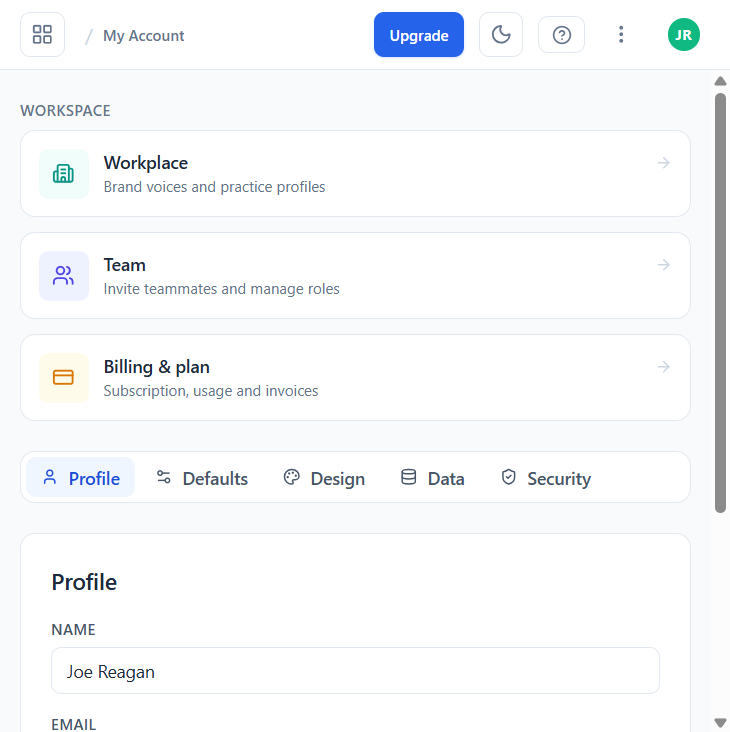
Open My Account from the All AI Tools menu (Ctrl/Cmd + K) or your profile avatar. Account is split into five tabs that each control a different area:
- Profile — name, email, and timezone used for timestamps in transcripts and notes.
- Defaults — preferred language, recording locale, and note output preferences.
- Design — light/dark mode and other UI preferences.
- Data — export, retention, and account deletion options.
- Security — change password and enable two-factor authentication (2FA).
Add Workplace and Team context
My Account also exposes shortcuts to Workplace (your clinic profile, used as context for AI generations), Team (invite teammates and manage roles), and Billing & plan (your subscription, usage and invoices). Setting these up early means letters, emails, and notes already include the right name, address, and signatures.